Dino Run
The cartoon starts by itself. It has sound, which a browser keeps off until you press something on the page: press Replay to hear it from the start.
How this template was made
- Model
- Claude Fable 5.2
- Generation time
- About 1 hour 30 minutes
Prompts, in order
Build a 15-second animation with no interaction, in the spirit of an endless runner: an orange dinosaur runs to the right, dodging and jumping obstacles, eats another dinosaur to get bigger, and in the end hits a wall. The wall is a huge "OGraf" text, seen when the camera zooms out. Then the animation stops.
Make the eaten dinosaur blue and very old, walking slowly with a cane and wearing a cowboy hat. Put a V on the orange dinosaur and a C on the old one, and give the orange dinosaur a tall Viking helmet.
Add a pterodactyl with an X, flying in the background. I want settings for day or night, for the landscape (the desert or a city) and for the dinosaurs' colours, and sound effects for the jumps, the hits, the eating and so on.
The pterodactyl should be red by default. It should hit the O too, and its beak should stick there while it flaps its wings. Make it bigger, so the X is readable, and give it a trapper hat.
When the camera zooms out, add a meteor coming into view: the end of the dinosaurs' era is getting near.
Prompts edited for clarity. The time is estimated from the session records and covers writing and building only, not waiting, checks or tests.
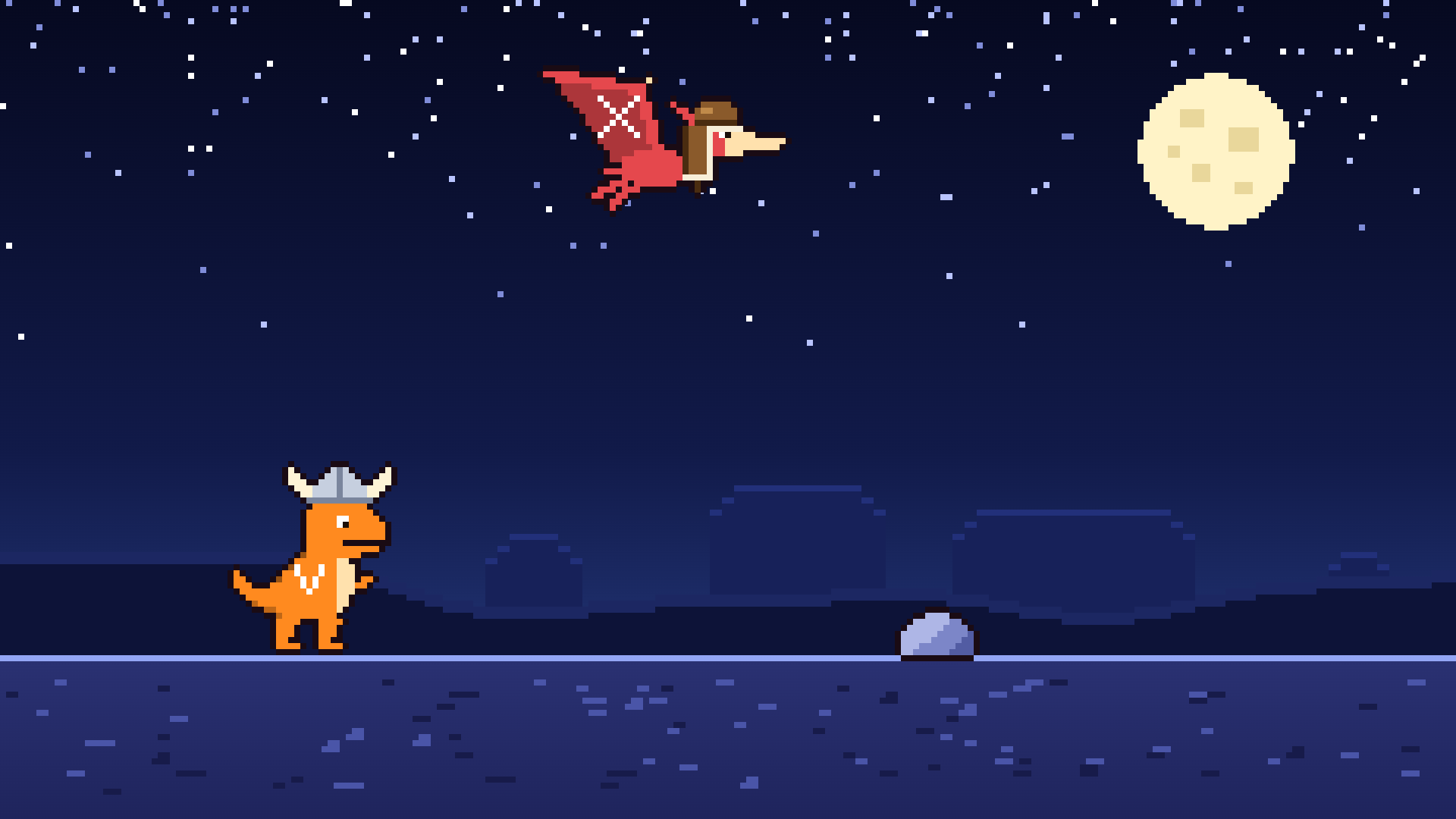
A cartoon, not a broadcast graphic: fifteen seconds in the spirit of an endless runner, built to show how far a timeline can go. An orange dinosaur in a Viking helmet runs to the right, jumps a rock and ducks under a dragonfly. It catches an old blue dinosaur walking on a cane, eats it and grows. Then it runs into a wall. The camera pulls back, and the wall turns out to be the first letter of a very large word.
There is no video in it and no script that runs while it plays. Every move is a key on Studio's timeline. All the pictures are original pixel art drawn for this example, and all the sounds were made for it.
Try it
The cartoon plays when the page opens. A browser keeps a page silent until you press something on it, so that first run is usually without sound. The sound comes on with your first press, anywhere on the page.
- Press Replay, at any moment. The cartoon starts over, with its 23 sound effects, and holds its last picture.
- Change Time of day to Day while it plays. The sky, the light on the land and the colour of the big word change in place, and the cartoon plays on.
- Change Landscape to City. The desert gives way to a skyline and a road.
- Pick new colours for the three animals. Their shading and their costumes stay as they are.
- Press Take out while it plays. The cartoon stops where it is and fades away, and Take in starts it again from its first frame.
- Press Fullscreen. The picture is 1920 × 1080 at 50 frames a second.
What you see
- The run: the Viking dinosaur, with a V on its side, jumps a rock and ducks under a dragonfly.
- The meal: an old blue dinosaur, with a C on its side, walks slowly on a cane in a cowboy hat. It is eaten, and only the hat is left behind. The Viking dinosaur grows.
- The wall: bigger now, it smashes through a rock, jumps the lava and runs into a wall. Stars go round its head.
- The pull-back: the camera pulls back until the whole word is in the picture. A pterodactyl in a trapper hat, with an X on its wing, has flown along all the while. It reaches the wall a moment earlier, and its beak is stuck in the letter.
- The meteor: as the camera pulls back, a meteor comes into the sky. It is still on its way when everything stops.
What you get
- One long Take in: the whole cartoon is the way in, 750 frames of it, and its first frame already holds the whole scene. The graphic then holds its last frame. Take out fades it away, in the middle of the cartoon too, and taken in again it plays from the first frame.
- Sprites by opacity: each pose of an animal is its own layer, and all of an animal's poses share the same position keys. A pose changes by one layer's opacity going to nothing while the next one's comes up, inside a single frame.
- A world that scrolls: rocks, lava and the old dinosaur ride on position keys. The hills, buildings, pebbles and road marks are strips that repeat.
- A camera made of keys: there is no camera in Studio. The pull-back is a position key and a size key on everything that stands in the world, all with the same easing. The big word is one vector shape, drawn seven times larger in the close view.
- Colours you can change: each pose is a vector shape under a picture. The shape takes the colour field, and the picture on top holds the outline, the shading and the costume.
- Value maps: Time of day picks a night or a day picture for each strip, and the colours of the sky and the word, through value maps on those layers.
- Rules: the desert and the city are separate layers. A rule on each shows or hides it by the Landscape field.
- Sound cues: 23 sound effects sit on the timeline as sound cues, each at its frame: the jumps and landings, the bite, the growing, the hit on the wall, the meteor's rumble and a short tune at the end. Sound makes this a real-time graphic only.
Make it yours
Download the .ogs file above and open it in Studio with File → Open. The pixel art, the
sounds and the timing come from the scripts in the site's
examples-src/dino-run
folder: the animals are grids of characters in art.mjs, the sounds are a few lines of arithmetic
each in sound.mjs, and build.mjs places every layer and key. The README in examples-src says
how to rebuild it.